
Viva VPN
Viva teamTools
4.31.14K Reviews
- Version
- 1.2.7
- Installs
- 10.00M
- Age Rating
- Everyone
Screenshots
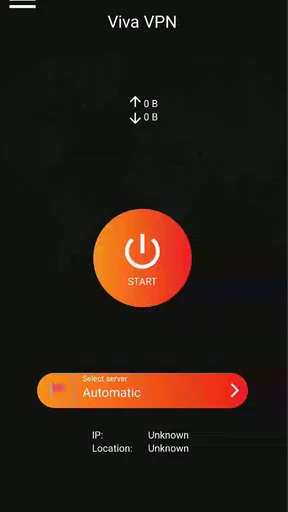
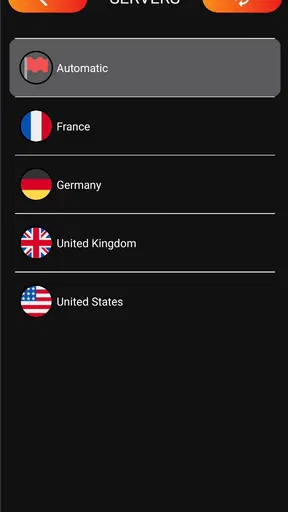
Our Review of Viva VPN
 Analysis by Appyee
My main takeaway from using Viva VPN is that it aims to make connecting feel effortless, which is appealing if you want a simple privacy tool rather than a settings-heavy networking app. That ease is useful, but it shouldn’t be mistaken for proof that every online activity becomes anonymous or that every streaming service will work. I’d treat it as a practical option for ordinary browsing, while checking whether its limits suit the way you actually use your phone.
A straightforward tool, with a few important questions
Viva VPN is a free Android tools app from Viva team. It has an Everyone age rating, an average rating of 4.4 from around 44,000 ratings, and more than 10 million installs. The current version is 1.2.7, and it runs on Android 6.0 or later. Those details make it easy to see why people might try it, but the more useful question is whether its simple approach fits your routine.
When I choose a VPN, I separate convenience from trust. A one-tap connection can make a public network less exposed to other users on that network, but a VPN provider also becomes part of the route my traffic takes. I would avoid treating any VPN as a magic privacy switch: account security, app permissions, device updates, and careful handling of sensitive information still matter.
Where a simple connection can help
A realistic use for Viva VPN is checking messages or reading news while waiting at a café, airport, or other shared Wi-Fi spot. I’d connect before opening the apps I need, then avoid entering especially sensitive information unless I was confident the service and the website were trustworthy. That small routine is more useful than connecting only after something feels wrong.
It can also suit light browsing when travelling, or when I want to try a different network route for a site that behaves differently by region. I would not plan an important live stream or a work call around an unfamiliar VPN connection, though. Network conditions vary, and a connection that feels fine for reading may not be steady enough for a video meeting.
How it compares with other VPN choices
Compared with a VPN built for advanced users, a simple app is easier to approach but offers less room for deliberate configuration. That trade-off matters if you want to choose specific protocols, fine-tune which apps use the tunnel, or inspect detailed connection information. For a person who only wants a quick on/off routine, fewer decisions can be a genuine advantage; for someone who wants control, it can feel restrictive.
It is also worth distinguishing a VPN from a privacy-focused browser or a secure messaging app. A browser can limit tracking within web pages, while encrypted messaging protects conversations in transit between participants. A VPN addresses the route between the device and the VPN service; it does not replace those tools, hide activity from every service you sign into, or make unsafe downloads safe. I would use it as one layer, not as a complete security plan.
Small habits that make the choice clearer
Before relying on Viva VPN for a regular task, I’d test it in the places I actually use my phone: home Wi-Fi, mobile data, and a shared network. Try a short browsing session, then open the apps you depend on. If pages stall or an app repeatedly asks you to verify your location, that is a sign to disconnect for that task or use a different connection rather than keep tapping around.
I’d also decide what “good enough” means before using a free VPN. For occasional reading and basic browsing, a modest allowance may be workable; for long video sessions, large downloads, or frequent use away from home, data limits can become the deciding factor. Keeping video quality lower and saving large downloads for a trusted home connection can stretch a limited allowance, but those workarounds will not suit everyone.
One practical point is to check the app’s current permissions and privacy information before connecting, especially if you plan to use it for work or personal accounts. I would not assume that encryption alone answers questions about how a VPN handles account details or activity. If your priority is a clearly documented privacy model, compare providers on that point before choosing; if your workplace has an approved VPN, use that for work resources.
For location-sensitive services, I’d keep expectations modest. A VPN may change the apparent network location, but streaming platforms and financial services can apply their own checks and may not behave as expected. I would not use a VPN to bypass a service’s rules, and I’d switch it off if a banking or ticketing app flags the connection or becomes unreliable.
Setting Up and First Impressions
First off, downloading and installing was a breeze. I hopped over to the app store, hit download, and before I knew it, I was ready to rock. The app’s interface is clean and intuitive, which is a breath of fresh air. I didn’t have to spend ages figuring out where everything was—just a couple of taps and I was connected to a server.
Features That Stand Out
One of the things I love is its simplicity. You don’t need to be a tech wizard to navigate through it. But don’t let that fool you, it’s packed with some pretty nifty features.
- Global Server Access: With servers in multiple countries, I could easily switch between locations to access content that’s region-locked. Whether it's catching up on a show or checking out a website that’s not available in my area, it’s all possible with a few taps.
- Fast and Reliable Connection: Let me tell you, speed matters! And Viva VPN didn’t disappoint. Streaming and browsing were smooth, with minimal buffering. It’s like having a secret superhighway for your data.
- Security and Privacy: Of course, a VPN’s main gig is keeping your data safe. Viva VPN uses top-notch encryption, so I felt secure knowing my online activities were cloaked in privacy.
Using Viva VPN Daily
Now, let’s talk about everyday use. I’ve been using it during my daily digital escapades, whether it’s working remotely or just scrolling through social media. The connection stability has been solid, and switching between servers is seamless.
One feature I appreciate is the Kill Switch. It’s like a security blanket—if the VPN connection drops, my internet connection goes too. This prevents any accidental exposure of my real IP address. It’s a small detail, but it makes a big difference when privacy is a priority.
What’s the Catch?
Alright, it’s not all sunshine and rainbows. While the app is convenient, it’s worth mentioning that the free version comes with limitations. There’s a cap on the data you can use, so if you’re a heavy streamer or downloader, you might find yourself running out of data pretty quickly. Upgrading to the premium version solves this, but it’s something to keep in mind if you’re on a tight budget.
That limit changes how I’d use it: I’d save the connection for the moments when it adds value, instead of leaving it on for every background task. For instance, I might turn it on for browsing over shared Wi-Fi, then switch it off before a long video session on a trusted home network. This makes a free allowance more useful, although it does mean remembering to manage the connection rather than treating it as invisible protection.
I would also test whether the kill-switch behavior suits the apps I need. If a tunnel drops, cutting off internet access can protect against an unprotected connection, but it can interrupt a call, upload, or map search at an inconvenient moment. That is a real trade-off: privacy can take priority over continuity, and someone who cannot tolerate a sudden interruption may prefer a provider and setup they have tested carefully for that specific job.
Who I’d recommend it to
I’d suggest trying it if you want a low-friction VPN for occasional browsing and understand that a free plan may not cover heavy use. It is a better fit for someone who values an uncomplicated connection than for a person who wants to inspect every technical setting or build a custom privacy setup. Before depending on it for travel, I’d try it at home first, learn how to disconnect quickly, and see how the apps I use respond.
I’d skip it as my sole solution for confidential work, large downloads, or dependable access to a particular streaming library. For work, an employer’s approved connection is the safer choice; for sustained high-volume use, I’d compare paid VPN plans and their data, privacy, and support terms rather than assume a free option will meet the need. If my main concern were browser tracking, I’d pair sensible browser protections with account security instead of expecting a VPN to solve everything.
Wrapping It Up
All in all, I’d say it is a solid choice for anyone looking to secure their online presence without a hassle. It’s user-friendly, fast, and reliable, making it a great companion for everyday internet use. Whether you’re tech-savvy or just starting your VPN journey, it offers a straightforward solution to keep your data safe and your online experience unrestricted.
If you’re curious to try it out, you can download it from your app store and take it for a spin. Who knows? It might just become your go-to tool for privacy and unrestricted browsing!
My verdict is positive with a clear boundary: I like the easy entry point, but I would choose a VPN by looking beyond the one-tap experience. For casual use, this could be a convenient starting point. For anything where privacy guarantees, uninterrupted access, or sustained data use is essential, I’d compare alternatives and read their terms before making it part of my routine.
Verdict
Strengths of Viva VPN
- Fast connection speeds for streaming.
- User-friendly interface for easy navigation.
- No-log policy ensures privacy.
- Wide range of global server locations.
- Affordable premium plans available.
Limitations of Viva VPN
- Free version has limited features.
- Occasional connection drops.
- No dedicated IP options.
- Ads in the free version.
- Limited customer support options.
Similar Picks in This Category
View All
Google LLC4.0

Gboard - the Google Keyboard
Google LLC4.5

Google Play services
Google LLC4.3

Google Play Store
Google LLC4.9

Files by Google
Google LLC4.5

SHAREit: Transfer, Share Files
Smart Media4U Technology Pte.Ltd.4.3
Frequently Asked Questions
What platforms is Viva VPN available on?
Viva VPN is available for both Android and iOS devices. Users can download the app from the Google Play Store for Android or the Apple App Store for iOS. The app is designed to work seamlessly across different devices, ensuring a secure and private browsing experience on smartphones and tablets.
Is Viva VPN free to use?
Viva VPN offers both a free version and a premium subscription. The free version provides basic features with limited server access, while the premium version offers enhanced features such as faster speeds, more server locations, and additional security protocols. Users can choose based on their needs and preferences.
How does Viva VPN ensure user privacy and security?
Viva VPN employs robust encryption protocols to protect user data and browsing activity. The app includes features such as a no-logs policy, which ensures that user activity is not recorded or stored. Additionally, it provides a kill switch feature to prevent data leaks if the VPN connection drops unexpectedly.
Can Viva VPN be used for streaming and torrenting?
Yes, Viva VPN supports streaming and torrenting. The app provides access to servers optimized for high-speed streaming, allowing users to bypass geo-restrictions on popular streaming platforms. Additionally, it supports P2P file sharing, making it a suitable choice for users interested in torrenting.
What should users do if they encounter connectivity issues with Viva VPN?
If users experience connectivity issues with Viva VPN, they can try troubleshooting steps such as switching to a different server, checking their internet connection, or restarting the app. The app also offers customer support to assist users with technical difficulties, ensuring a smooth and uninterrupted VPN experience.
